Mos. supports translations for text strings used throughout an app.
Translations are defined in JSON files and can be referenced using the $lang()$ keyword.
Quick guide
A basic translation setup can look like this:
./translation/
├── de.json
└── default.json
The default.json file contains the app's default translations.
{
  "name": "default",
  "content": {
    "homeHeader": "My App"
  }
}
The de.json file contains the German translations.
{
  "name": "de",
  "content": {
    "homeHeader": "Meine App"
  }
}
A translation can then be referenced using the $lang()$ keyword with the translation key.
{
  "type": "text",
  "value": "$lang(homeHeader)$"
}
The translation key homeHeader resolves to My App.
Translation files
default.json is used as the default language and as the fallback when no translation is available for the active language.
Each additional language requires its own JSON file, e.g. de.json.
./translation directory
Translation files are stored in the ./translation directory.
./translation/
├── de.json
├── default.json
├── en.json
└── fr.json
Translation file structure
Each translation file contains a name and a content object.
{
  "name": "default",
  "content": {
    "homeHeader": "My App"
  }
}
The name property must match the language identifier used by the filename.
./translation/
├── de.json
└── default.json
The content object contains simple key-value pairs of the translation keys and the respective translation values for each translatable string in the app.
{
  "name": "default",
  "content": {
    "homeHeader": "My App",
    "homeSubtitle": "Welcome to my App.",
    "settingsHeader": "Settings",
    "settingsLogin": "Log into your account"
  }
}
It is recommended that you sort your translation files alphanumerically and optionally prefix your translation keys depending on their usage in the app. This makes translation files easier to maintain and helps identify where a key is used.
Using translations
Use the $lang() keyword to reference a translation key.
mos. resolves the key according to the currently active language and the fallback rules described above.
Given the following translation setup:
./translation/
├── de.json
└── default.json
{
  "name": "default",
  "content": {
    "homeHeader": "My App"
  }
}
{
  "name": "de",
  "content": {
    "homeHeader": "Meine App"
  }
}
The translation key homeHeader resolves to My App, or to Meine App when German (de) is the active language.
In a layout
Because translations are static values, they can be used directly in a layout. Using a client template is not required.
./translation/
└── default.json
{
  "name": "default",
  "content": {
    "homeHeader": "My App",
    "homeSubtitle": "Welcome to my App"
  }
}
{
  "name": "c_home",
  "layers": [
    {
      "type": "text",
      "value": "$lang(homeHeader)$"
    },
    {
      "type": "text",
      "value": "$lang(homeSubtitle)$"
    }
  ]
}
In a database query
Translations can also be evaluated directly in an SQLite query.
The following query returns a translated value depending on the current day:
{
  "table": {
    "name": "myTable",
    "fields": [...],
    "primaryKey": [...],
    "queries": {
      "myQuery": {
        "custom": "SELECT iif(strftime('%w') IN ('0', '6'), '$lang(weekend)$', '$lang(weekday)$') AS typeOfDay FROM myTable"
      }
    }
  }
}
The resulting field can then be used in a client template:
{
  "name": "myClientTemplate",
  "content": {
    "content": {
      "mainLabelText": {
        "value": "{{typeOfDay}}"
      }
    }
  }
}
Translation fallbacks
To resolve a translation, mos. checks the current language first and falls back to default.json if necessary. If the translation key does not exist in either translation file, the $lang() keyword with the translation key is displayed instead.
$lang(translationKey)$ therefore resolves to:
- the translation from the current language, if available
- otherwise, the translation from
default.json
- otherwise,
$lang(translationKey)$ is displayed unchanged
./translation/
├── de.json
└── default.json
{
  "name": "default",
  "content": {
    "homeHeader": "My App",
    "homeSubtitle": "Welcome to my App"
  }
}
{
  "name": "de",
  "content": {
    "homeHeader": "Meine App"
  }
}
{
  "name": "c_home",
  "layers": [
    {
      "type": "text",
      "value": "$lang(homeHeader)$"
    },
    {
      "type": "text",
      "value": "$lang(homeSubtitle)$"
    },
    {
      "type": "text",
      "value": "$lang(homeContent)$"
    }
  ]
}
Managing the language
The currently active language is controlled by the AF_SETTING_LANGUAGE user setting.
Setting the language
You can use the setValueToUserSetting action to set the current language.
The following action sets the current language to German (de):
{
  "type": "setValueToUserSetting",
  "params": {
    "key": "AF_SETTING_LANGUAGE",
    "value": "de"
  }
}
mos. then uses ./translation/de.json for translations.
If de.json does not exist, mos. falls back to default.json.
The default language can also be selected by setting AF_SETTING_LANGUAGE to default.
Switching between languages
You can switch between languages while the app is running.
The example also demonstrates the fallback behavior by selecting French (fr) without providing a fr.json file.
./translation/
├── de.json
└── default.json
{
  "name": "default",
  "content": {
    "homeHeader": "My App",
    "homeSubtitle": "Welcome to my App",
    "languageEnglish": "English",
    "languageFrench": "French",
    "languageGerman": "German"
  }
}
{
  "name": "de",
  "content": {
    "homeHeader": "Meine App",
    "homeSubtitle": "Willkommen in meiner App",
    "languageEnglish": "Englisch",
    "languageFrench": "Französisch",
    "languageGerman": "Deutsch"
  }
}
{
  "type": "setValueToUserSetting",
  "params": {
    "key": "AF_SETTING_LANGUAGE",
    "value": "default"
  }
}
{
  "type": "setValueToUserSetting",
  "params": {
    "key": "AF_SETTING_LANGUAGE",
    "value": "de"
  }
}
{
  "type": "setValueToUserSetting",
  "params": {
    "key": "AF_SETTING_LANGUAGE",
    "value": "fr"
  }
}
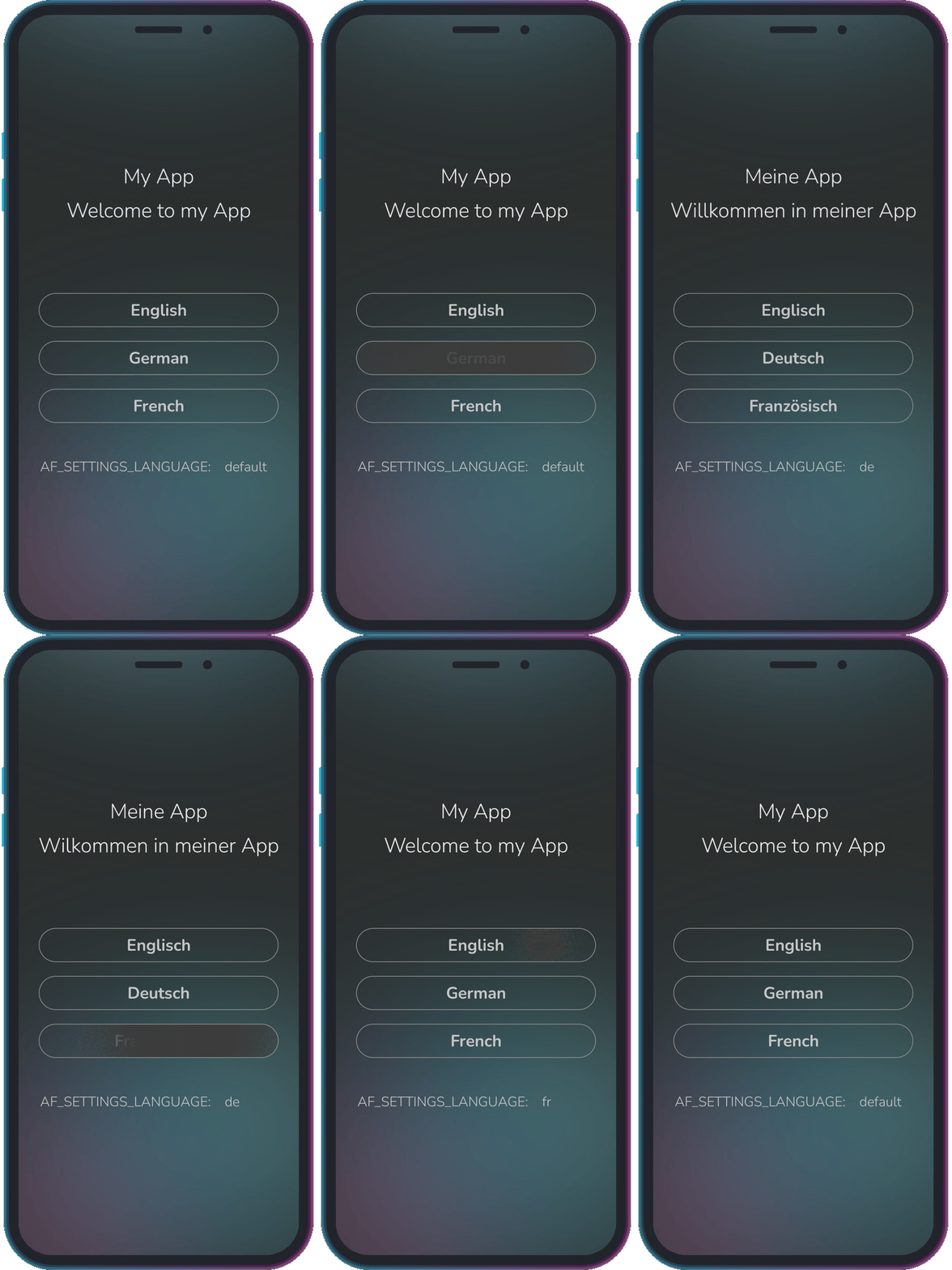
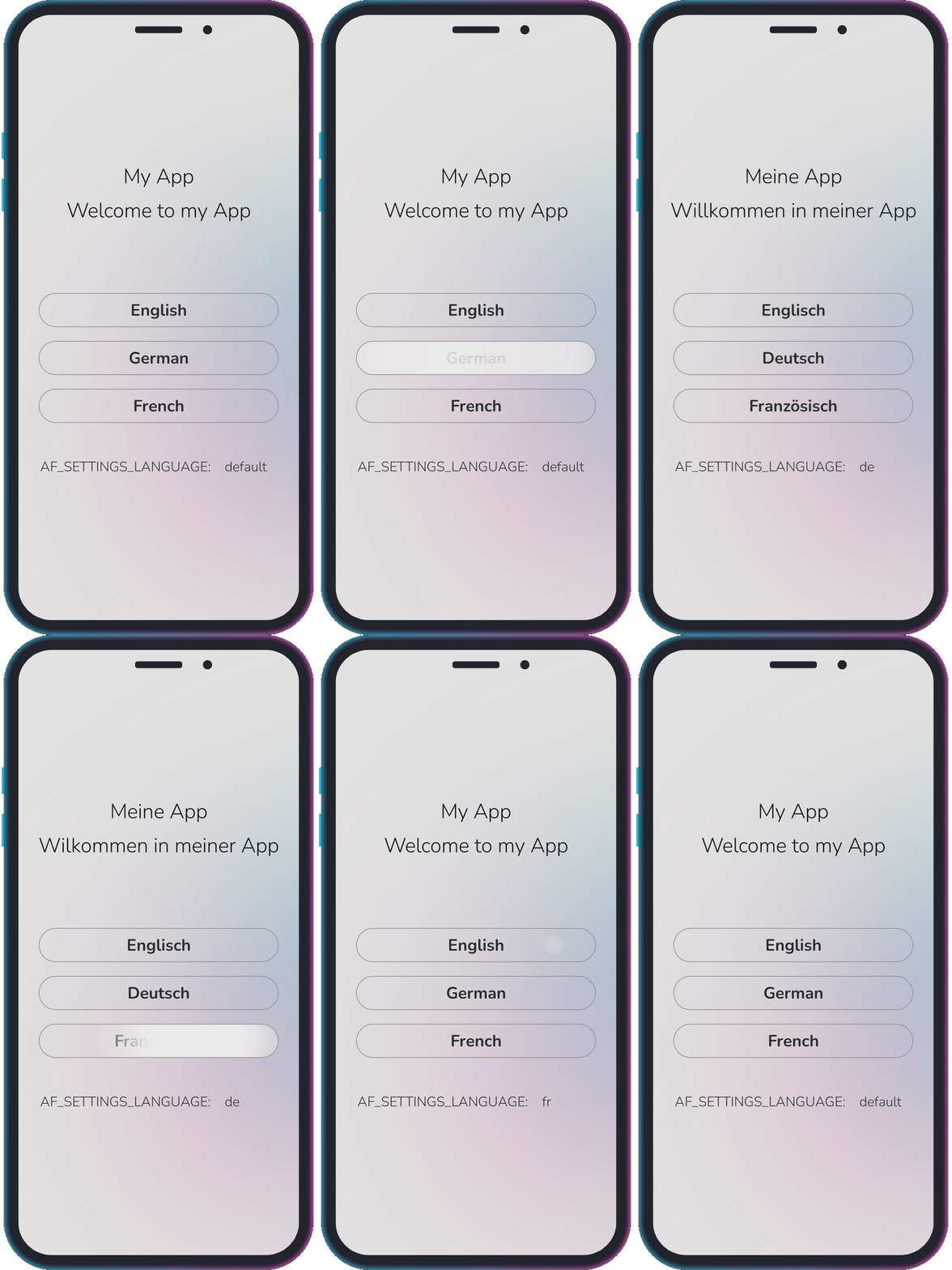
Since fr.json does not exist, selecting fr causes mos. to fall back to default.json.
Troubleshooting
If the translation is not displayed, check the following:
- Does the translation key exist?
- Is the key spelled correctly?
- Is the language file located in
./translation/?
- Does the filename match
AF_SETTING_LANGUAGE?
- Does the
name property match the language identifier used by the filename?
- Does the key exist in
default.json?